
Endpoint Hardening: The Argument and the Checklist
Jon Pertwee · 2024 (updated 2026)
| Part One: For IT Managers and Security Leads |
Reading Cybersecurity Data Critically
Cybersecurity reporting is full of alarming statistics. A significant portion of those statistics are misleading, not because they are fabricated, but because of how they are presented and sourced. Before allocating budget or prioritising security investment based on industry data, it is worth understanding the most common ways that data is misrepresented.
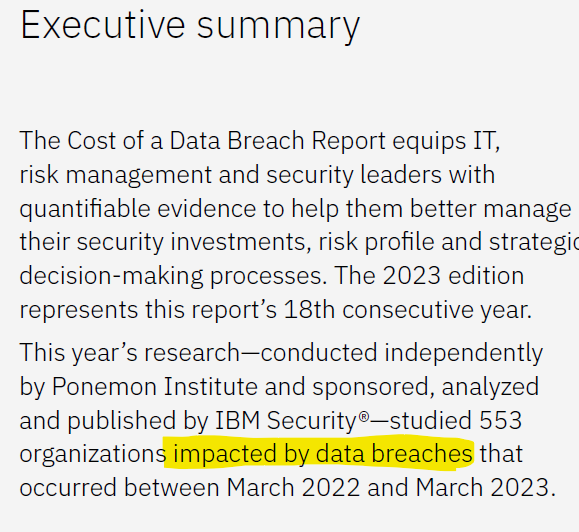
A specific example: the Harvard Business Review published an article in 2023 stating that ‘the latest IBM Data Breach Report revealed that an alarming 83% of organizations experienced more than one data breach during 2022.’ This is technically accurate but analytically misleading. The IBM Cost of a Data Breach Report is compiled exclusively from organisations that have already experienced a data breach. It is a study of breach costs among breach victims, not a study of the general population of organisations. The correct reading of the 83% figure, is that 83% of organisations that had already been breached were breached again, which is a meaningfully different and substantially less alarming claim.
Vendor-produced cybersecurity research has a similar problem: it tends to draw from data that supports the need for the product being sold. This does not make the underlying statistics false, but it does mean the framing consistently overstates risk in ways that serve commercial rather than analytical interests.
Reliable, relatively unbiased sources for cybersecurity data include Verizon’s annual Data Breach Investigations Report, NIST publications, and national cybersecurity authority outputs from bodies such as NCSC (UK), CISA (USA), and the Australian Cyber Security Centre. These are referenced in the technical section below.
What the Data Actually Shows
During my MSc research, I reviewed over 4,500 articles covering cybersecurity over a ten-year period, drawing on survey data from publicly available sources covering more than 62,000 respondents. One of the outputs was a comparison of common cybersecurity discovery and governance processes against breach incidence, specifically in the context of Zero Trust implementation, but the findings apply broadly to cybersecurity programme design.
The table below shows the percentage of organisations that had not completed each process (Non-Compliance), the percentage of breaches in which that process gap was identified as a contributing factor (Breach), and the relative risk calculated from those figures.
| Process | Non-Compliance | Breach | Relative Risk |
| Devices Discovery | 86% | 73% | 0.85 |
| Application Discovery | 53% | 50% | 0.94 |
| Shadow IT Discovery | 36% | 41% | 1.14 |
| Service Discovery | 80% | 75% | 0.94 |
| Data Discovery | 52% | 76% | 1.46 |
| Least Privilege | 61% | 67% | 1.10 |
| Risk Assessment | 20% | 92% | 4.60 |
| Threat Modelling | 64% | 60% | 0.94 |
| Average / Total | 57% | 67% |
Table 1: Cyber Discovery Processes vs Breach Incidence. Source: MSc thesis research, Arden University, 2024. Total data points: 62,296.
Two findings stand out. First, on average two thirds of organisations have at some point suffered a breach, and 57% are failing to undertake basic discovery and governance processes that would materially reduce that risk. Second, risk assessment has a relative risk figure of 4.6, more than three times higher than any other process in the table. Organisations that do not have a formal risk assessment programme are not just slightly more exposed. They are dramatically more exposed.
This finding is the strongest single argument for prioritising a risk management programme over any specific technical control. Technology cannot compensate for not knowing what risks the organisation faces. The configuration checklist in Part Two of this post is only useful in the context of a risk assessment that has identified which of those configurations actually matter for a given environment.
A Process for Endpoint Hardening
Endpoint hardening is not a one-time project. It is an ongoing process that requires governance: documented policies and procedures that can be followed consistently, reviewed regularly, and updated as the threat landscape and the organisation’s environment change. The following sequence applies regardless of organisational size:
- Identify the risk. A risk assessment determines which threats are relevant to the organisation’s environment and which mitigations are proportionate. Without this step, hardening efforts are likely to be costly and misaligned. NIST Risk Management Framework, SP 800-30, SP 800-37, SP 800-39 all provide rigorous methodologies.
- Select configurations. Review the checklist below and identify the configurations that address the risks identified in the assessment. Not every configuration will be appropriate for every environment.
- Test before deploying. Verify that each configuration mitigates the risk it is intended to address and that it does not break legitimate business processes. Security measures that prevent normal operations will be bypassed.
- Deploy in phases. Phased deployment limits the blast radius of unforeseen impacts. Maintain a backout plan for each phase.
- Document and report exceptions. Every exception to the hardening baseline is a risk that has been accepted. Document it, assign an owner, and include a remedial timeline.
| Part Two: Technical Reference — Endpoint Hardening Checklist |
This section is a curated technical reference for IT administrators and security engineers responsible for implementing endpoint hardening. All external links were verified at time of writing; verify currency before use.
Mitigate Vulnerable Legacy Protocols
Windows has maintained backwards compatibility with several protocols that are now demonstrably insecure. Disabling or replacing these reduces the attack surface significantly.
Server Message Block v1 (SMBv1)
SMBv1 is the protocol exploited by WannaCry and NotPetya. It has no legitimate use in modern environments and is being removed from Windows 11 entirely.
Resource: https://techcommunity.microsoft.com/t5/storage-at-microsoft/stop-using-smb1/ba-p/425858
PowerShell 2.0
PowerShell 2.0 bypasses the logging and constrained language mode introduced in later versions. Disable it.
Resource: https://www.stigviewer.com/stig/windows_10/2017-04-28/finding/V-70637
TLS 1.0 / 1.1 and SSL (all versions)
Deprecated transport layer security protocols with known vulnerabilities. Replace with TLS 1.2 minimum; TLS 1.3 where supported.
Resource: https://docs.microsoft.com/en-us/security/engineering/solving-tls1-problem
LanMan (LM) and NTLMv1
Authentication protocols with significant weaknesses. Enforce NTLMv2 only; refuse LM and NTLMv1.
Resource: https://www.stigviewer.com/stig/windows_10/2021-08-18/finding/V-220938
Digest Authentication (WDigest)
WDigest stores credentials in plaintext in memory, making them trivially accessible to credential-dumping tools. Disable it.
Resource: https://www.stigviewer.com/stig/windows_10/2017-02-21/finding/V-71763
Patching
Unpatched vulnerabilities remain one of the most common initial access vectors. A consistent, automated patch management process is a baseline requirement.
NCSC Vulnerability Management: https://www.ncsc.gov.uk/collection/10-steps/vulnerability-management
OS Hardening
Strengthening the operating system configuration provides a foundation for all other controls.
Attack Surface Reduction (ASR) Rules
Microsoft ASR overview: https://docs.microsoft.com/en-us/microsoft-365/security/defender-endpoint/overview-attack-surface-reduction?view=o365-worldwide
Bitdefender ASR configuration: https://www.bitdefender.com/business/support/en/77209-91368-aae-configuration.html
Lateral Movement Restriction
NCSC: Preventing lateral movement: https://www.ncsc.gov.uk/guidance/preventing-lateral-movement
Restricting SMB-based lateral movement: https://blog.palantir.com/restricting-smb-based-lateral-movement-in-a-windows-environment-ed033b888721
Native OS Security Features
- Reputation-based protection (SmartScreen for Edge, Microsoft Store Apps)
- Potentially unwanted app blocking
- Secure Boot
App and browser control: https://support.microsoft.com/en-us/windows/app-browser-control-in-windows-security-8f68fb65-ebb4-3cfb-4bd7-ef0f376f3dc3
Secure Boot: https://docs.microsoft.com/en-us/windows-hardware/design/device-experiences/oem-secure-boot
Logging
Comprehensive logging is the foundation of detection. Without it, dwell time extends and incident investigation is severely impaired.
Optimising Windows logging for security: https://www.blumira.com/how-to-optimize-windows-logging-for-security/
Remove Unneeded Applications and Features
Every installed application is a potential attack surface. Remove anything not required for business function.
Resource: https://johnopdenakker.com/remove-unused-and-unnecessary-software/
Network Hardening
Disable or Harden RDP
RDP is one of the most commonly exploited remote access protocols. If it cannot be disabled, restrict it to known IP ranges and enforce MFA.
Hardening RDP on domain controllers: https://dirteam.com/sander/2020/08/07/howto-harden-remote-desktop-connections-to-domain-controllers/
Disable DNS Multicast (LLMNR)
LLMNR is exploited by poisoning attacks that capture credentials on local networks. Disable it via Group Policy.
How to disable LLMNR: https://www.blackhillsinfosec.com/how-to-disable-llmnr-why-you-want-to/
Disable NetBIOS
Disable NetBIOS in Windows networks: https://4sysops.com/archives/disable-netbios-in-windows-networks/
Disable Smart Multi-Homed Name Resolution (SMHNR)
SANS: Preventing Windows 10 SMHNR DNS leakage: https://www.sans.org/white-papers/40165/
Configure the Firewall
Demystifying the Windows Firewall (video): https://www.youtube.com/watch?v=InPiE0EOArs
Account Protections
Restricting the attack surface available through local accounts and credential stores frustrates privilege escalation and lateral movement.
Remove Local Admin Rights
Standard users should not have local administrator rights. This single control materially reduces the impact of malware execution and credential theft.
Least Privilege (CISA): https://www.cisa.gov/uscert/bsi/articles/knowledge/principles/least-privilege
Harden Local Administrator Accounts
Microsoft: Securing Local Administrator Accounts and Groups: https://docs.microsoft.com/en-us/windows-server/identity/ad-ds/plan/security-best-practices/appendix-h–securing-local-administrator-accounts-and-groups
Limit Logon Rights
Microsoft: User Rights Assignment: https://docs.microsoft.com/en-us/windows/security/threat-protection/security-policy-settings/user-rights-assignment
Protected Users Security Group (Active Directory)
Microsoft: Protected Users Security Group: https://docs.microsoft.com/en-us/windows-server/security/credentials-protection-and-management/protected-users-security-group
Credential Guard
Windows Defender Credential Guard: https://docs.microsoft.com/en-us/windows/security/identity-protection/credential-guard/credential-guard
Application Hardening
Commonly deployed applications are frequently targeted because their default configurations prioritise functionality over security. Applying hardening configurations to these reduces easy opportunities for exploitation.
Microsoft Office Suite
Australian Cyber Security Centre: Hardening Microsoft 365 and Office: https://www.cyber.gov.au/acsc/view-all-content/publications/hardening-microsoft-365-office-2021-office-2019-and-office-2016
Precursor Security: Securing Microsoft Office deployments: https://www.precursorsecurity.com/security-blog/how-to-secure-microsoft-office-desktop-deployments-a-technical-guide
Adobe Reader
Security Musings: Hardening Adobe Reader: https://securitymusings.com/article/1844/hardening-adobe-reader
General Application Hardening Process
-
-
- Identify the application and its business function
- Evaluate its attack surface and associated risks
- Research hardening configurations specific to that application and version
- Test configurations against business requirements before deployment
- Deploy and document
-
Browser Hardening
Browsers are one of the most-used and least-hardened applications in most environments. Basic security configuration significantly reduces exposure to web-based attacks.
Phishing Filter and Safe Browsing
Chrome: Safe Browsing: https://support.google.com/chrome/answer/9890866
Edge: SmartScreen configuration: https://admx.help/?Category=EdgeChromium&Policy=Microsoft.Policies.Edge::SmartScreenPuaEnabled_recommended
Firefox: Safe browsing: https://admx.help/?Category=Firefox&Policy=Mozilla.Policies.Firefox::browser_safebrowsing_phishing_enabled
Process Sandboxing
Most modern browsers isolate rendering processes. Microsoft Defender Application Guard extends hardware-isolated sessions to browser activity on risky sites.
Edge: Microsoft Defender Application Guard: https://docs.microsoft.com/en-us/deployedge/microsoft-edge-security-windows-defender-application-guard
Extension Control
Unmanaged browser extensions represent a significant and frequently overlooked attack surface. Enforce an approved extension list via Group Policy or MDM.
Chrome: Managing extensions in enterprise: https://support.google.com/chrome/a/answer/9296680
Edge: Managing extensions in enterprise: https://docs.microsoft.com/en-us/deployedge/microsoft-edge-manage-extensions
Firefox: Policy templates: https://github.com/mozilla/policy-templates/blob/master/README.md#extensionsettings
Additional Reference Sources
Universal
Windows Security Configuration Framework (Microsoft): https://github.com/microsoft/SecCon-Framework/blob/master/windows-security-configuration-framework.md
CISA Insights: Hardening Guidance for SMBs: https://www.cisa.gov/sites/default/files/publications/CISA%20Insights_Guidance-for-MSPs-and-Small-and-Mid-sized-Businesses_S508C.pdf
CIS Critical Security Controls: https://www.cisecurity.org/controls
NSA/CISA: Embracing the Zero Trust Security Model: https://media.defense.gov/2021/Feb/25/2002588479/-1/-1/0/CSI_EMBRACING_ZT_SECURITY_MODEL_UOO115131-21.PDF
Mandiant: Proactive Preparation and Hardening: https://www.mandiant.com/sites/default/files/2022-03/wp-proactive-preparation-and-hardening.pdf
CVE Trends: Crowdsourced CVE intelligence: https://cvetrends.com
PwnDefend: Endpoint Security Essentials: https://www.pwndefend.com/2021/02/23/endpoint-security-the-essentials/
Australia
ACSC: Essential Eight Mitigation Strategies: https://www.cyber.gov.au/acsc/view-all-content/essential-eight
Canada
CCCS: Baseline Cyber Security Controls for SMOs: https://cyber.gc.ca/en/guidance/baseline-cyber-security-controls-small-and-medium-organizations
United Kingdom
NCSC: Cyber Essentials: https://www.ncsc.gov.uk/cyberessentials/overview
NCSC: 10 Steps to Cyber Security: https://www.ncsc.gov.uk/collection/10-steps
NCSC: Device Security Guidance: https://www.ncsc.gov.uk/collection/device-security-guidance
United States
DISA STIG Viewer: Complete STIG List: https://www.stigviewer.com/stigs
Windows 10 Security Technical Implementation Guide: https://www.stigviewer.com/stig/windows_10/